 NTFSTool
SUMMARY
- Developed in-house. OpenMacFUSE is an NFSv4.0 server linked into the driver process that exposes the FUSE 2.x API. It is about 17,000 lines of C, implemented from RFCs 7530, 5531 and 4506 and released under the MIT license. It is one of a small number of open-source macOS FUSE implementations that need no kernel extension.
- Speed. The gap is widest on metadata-heavy workloads: checksumming every file on a volume takes 23 s versus 797 s with FUSE-T, and deleting 10,000 small files is 6–9 times faster. Sequential reads and writes of large files on real USB drives show no measurable difference.
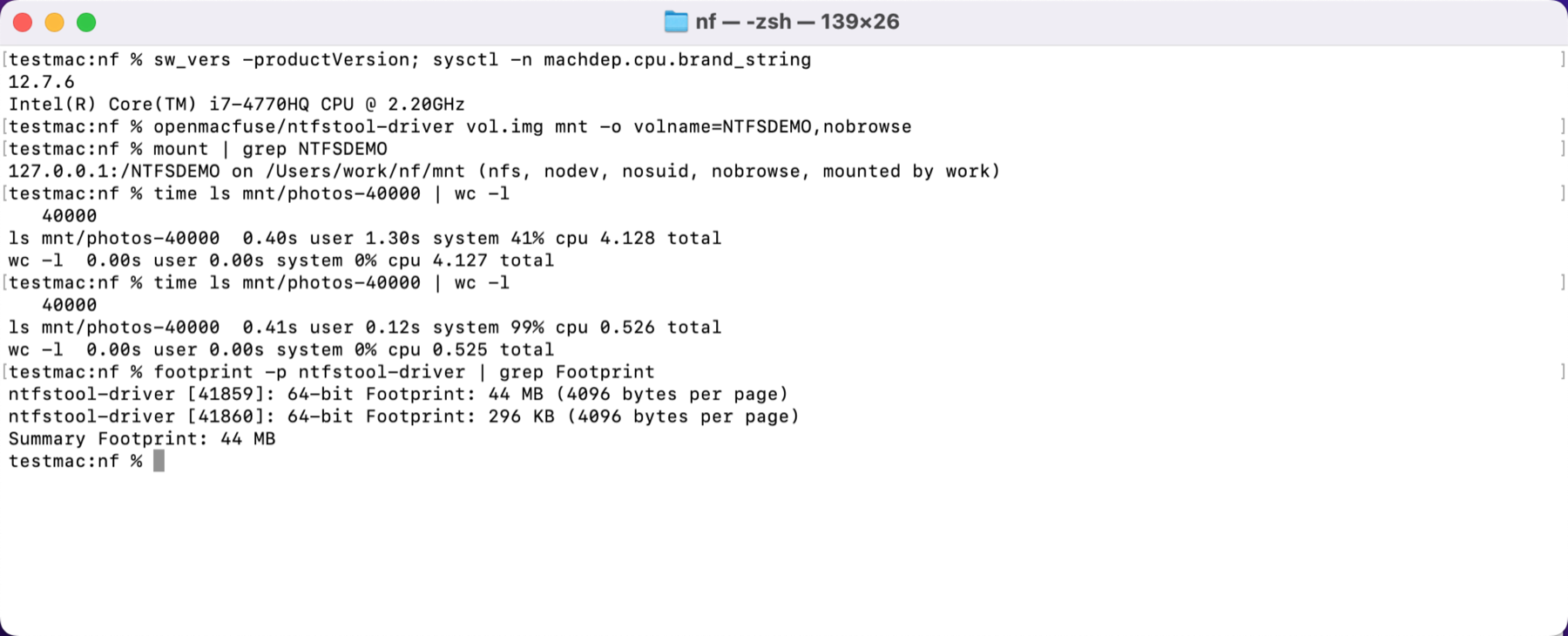
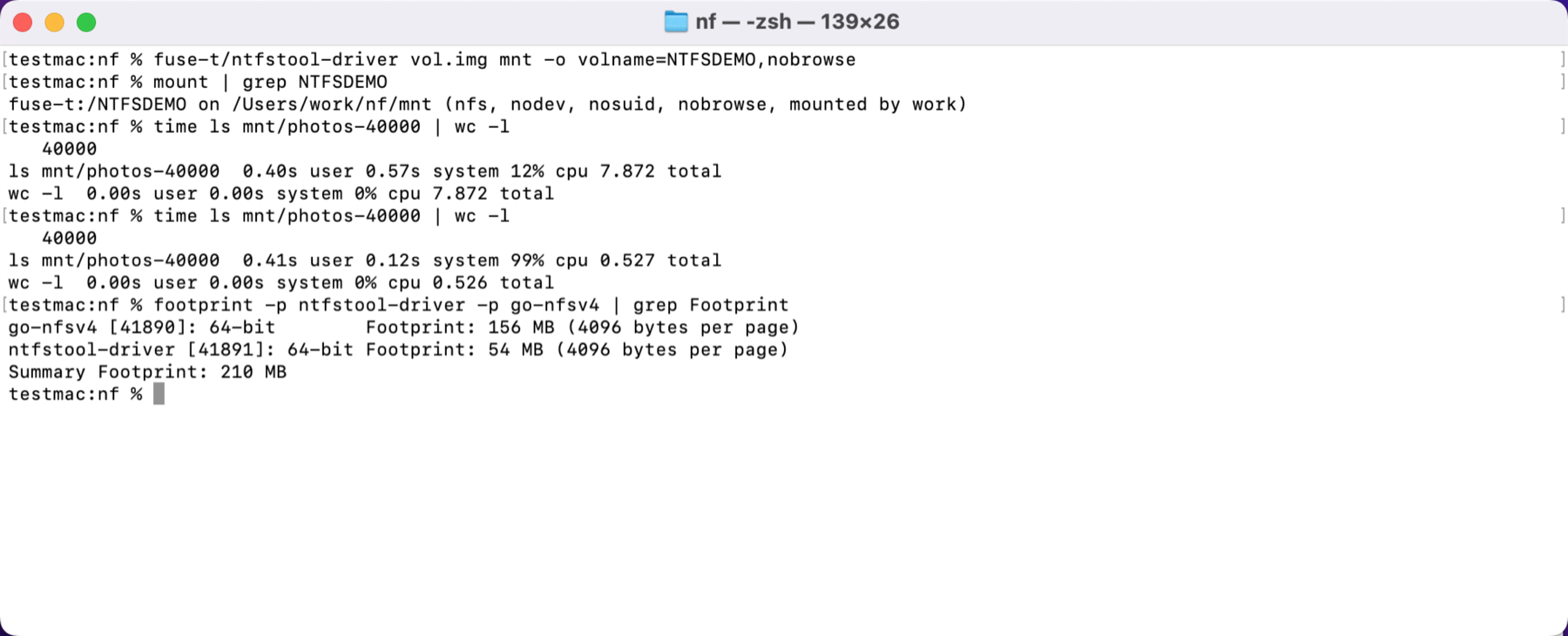
- Memory. The driver process uses 45–51 MB of physical memory, regardless of file count or uptime.
- Reliability. When USB power is cut during a write, the driver unmounts and exits within 0.5 s. When power returns, the volume mounts normally and no file has corrupted content; the only losses are writes completed in roughly the last second.
- Maintainability. The protocol layer, the FUSE interface and the NTFS engine live in one codebase, so a problem in the mount layer can be traced and fixed directly, without waiting on a third party's release schedule.
23 s vs. 797 s
381 MB with FUSE-T
measured on a USB SSD
all passing on macOS 12
1 Background2 Architecture3 Performance4 Memory5 macOS semantics6 Failure handling7 Methodology8 Limitations9 ConclusionFAQ
1Background
Since macOS 11, loading a kernel extension requires the user to start up in macOS Recovery and switch the Mac to Reduced Security. For software aimed at everyday users, that route is no longer practical. There are two main ways to stay out of the kernel: Apple's FSKit (available from macOS 15.4 and used by NTFSTool's "Driver 2"), and the NFS client built into macOS. The second approach runs an NFS server on the local machine, translates file system operations into calls to a user-space driver, and mounts the result with mount_nfs. FUSE-T takes this approach and is its most mature implementation; it is the baseline for every comparison in this article.
We chose to implement this layer ourselves for three engineering reasons:
- Deployment. FUSE-T is a separate component. It has to be installed on first use with an administrator password, which adds a step and one more thing that can fail.
- Fixability. A third-party mount layer is distributed as a binary. We can reproduce problems in it, such as slow listings of large directories or growing memory use, but only its author can fix them.
- Semantics. A general-purpose mount layer knows nothing about NTFS. Case rules, the hidden and read-only attributes, and where extended attributes are stored can only be handled correctly alongside the file system engine.
2Architecture
OpenMacFUSE is linked into the driver as a static library. When the driver starts, it listens on a local endpoint inside its own process and then calls the system's mount_nfs. Each COMPOUND request from the kernel NFS client is decoded, dispatched to the FUSE callbacks and answered within that one process. There is no second process, and no extra copy or context switch along the way.
Transport and mount options
macOS 26 and later use a Unix domain socket (proto=ticotsord). No port is opened, and other users on the machine cannot connect. The kernel client in macOS 12 fails on large writes over that transport, so earlier versions of macOS fall back to TCP on 127.0.0.1, with two server-side checks that the connection comes from the local mount. These are the options the system reported after a mount on macOS 27:
$ nfsstat -m <mount point>
NFS parameters: vers=4.0,ticotsord,port=/var/folders/…/openmacfuse.P1wAL0/s,hard,intr,
  noresvport,nocallback,negnamecache,nonamedattr,noacl,noaclonly,locks,noquota,
  rsize=262144,wsize=262144,readahead=16,dsize=32768,nordirplus,nodumbtimer,
  timeo=10,maxgroups=16,…,deadtimeout=60
nonamedattr is the system client's default and determines how extended attributes are handled in section 5. nordirplus is our choice; its cost is covered in section 8.Implementation choices
- A bounded node table. A file handle is not a pointer to an object in memory. The node table has a size limit, and a handle whose node was evicted is resolved again by path the next time it is used. In testing we lowered the limit to 64 entries and renamed 301 times in a row; all 7,839 accesses through old handles were recovered and none returned
NFS4ERR_STALE. This is why memory does not grow with the number of files. - Duplicate request cache. The client resends a request after a timeout. For non-idempotent operations such as CREATE, REMOVE and RENAME, the server caches recent replies and answers a resend from that cache instead of executing the operation again. In testing we dropped one reply for each of six operation types; every operation ran exactly once.
- No named attributes. NFSv4 named attributes are the natural protocol fit for extended attributes, but the macOS kernel NFS client has a defect on that path that crashes the system. We hit it during development on macOS 27.0.1 and 12.7.6. OpenMacFUSE therefore stays on the path the client uses most, and named attributes remain off.
3Performance
OpenMacFUSE is 6 to 35 times faster than FUSE-T 1.0.49 on metadata-heavy workloads and on par for sequential reads and writes on real USB drives. Method: the same machine, the same volume image and the same NTFS engine source, linked once against OpenMacFUSE and once against FUSE-T 1.0.49. The image sits on the internal SSD and I/O goes through the system page cache, so Figure 3 measures the overhead of the mount layer plus the engine, not the disk. Real-drive results are listed separately in Table 1.
 OpenMacFUSE
 FUSE-T 1.0.49
| Table 1 · Real USB drives | OpenMacFUSE | FUSE-T |
|---|---|---|
| SSD, sequential write 4.5 GB | 293–313 MB/s | 300 MB/s |
| SSD, cold read | 245–251 MB/s | 236–241 MB/s |
| SSD, directory tree walk | 0.25–0.30 s | 4.1–4.6 s |
| SSD, delete 2,000 small files | 0.82–0.86 s | 8.4–9.7 s |
| Hard drive, sequential write / read | 70 / 97 MB/s | 74 / 93 MB/s |
SSD measured on Apple M2 / macOS 27; hard drive on Intel i7 / macOS 12.7. Sequential throughput is limited by the USB link and the drive itself; the differences are within measurement noise.
One result left out: small-file creation. After these benchmarks the default flush policy of OpenMacFUSE was made more conservative (section 6), which made small-file creation about twice as slow. The real-drive comparison with FUSE-T has not been repeated under the new policy, and we will not quote the old numbers until it has.
4Memory
OpenMacFUSE stays at 45–51 MB of physical memory regardless of workload or uptime; FUSE-T used 200 MB to 1 GB in the same tests. All values are physical footprint, the same measure as the Memory column in Activity Monitor. For OpenMacFUSE this is the single driver process; for FUSE-T it is the driver process plus its NFS server process. Both include about 35 MB of block cache that belongs to the NTFS engine.
5macOS semantics
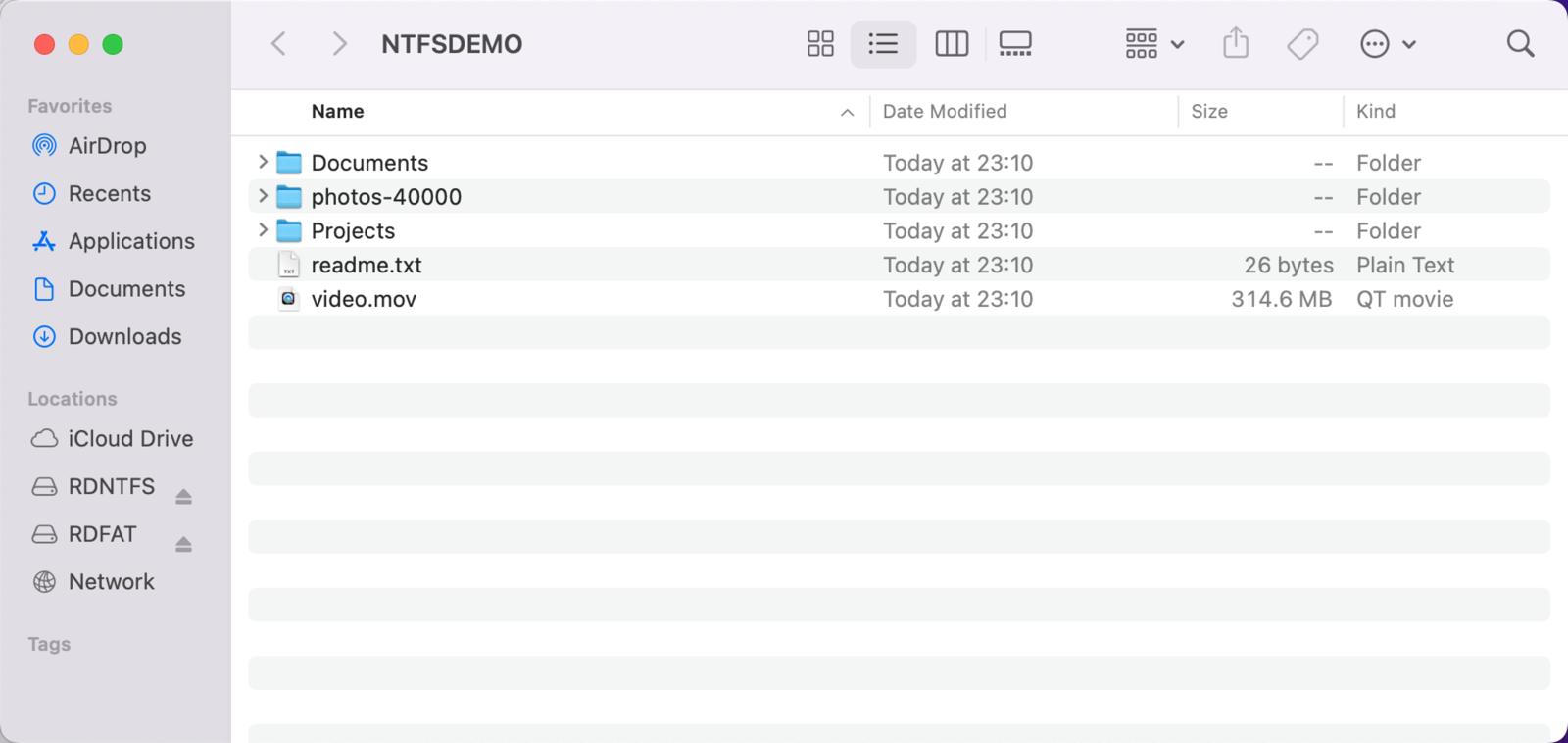
OpenMacFUSE keeps ._ files off the drive and maps NTFS attributes to their macOS equivalents.
._ files.AppleDouble
By default the macOS NFS client does not use named attributes. It packs a file's extended attributes, resource fork and Finder info into an AppleDouble file named ._filename and sends it to the server with ordinary OPEN and WRITE operations. If the server simply stores what it receives, those files end up on the drive, where they show up as clutter in Windows.
This became more visible with macOS 26: the system attaches a com.apple.provenance attribute to every new file, so every file comes with a ._ companion. Writing one dataset of 40,000 small files through FUSE-T left 40,048 extra ._ files on the drive. A git repository on the volume showed 48 untracked files, and git fsck reported 67 errors.
OpenMacFUSE detects access to ._ files on the server, parses the AppleDouble content and writes each attribute into an NTFS alternate data stream of the main file. On read it rebuilds the AppleDouble file on demand. No separate file is created on disk and none appears in directory listings. On a drive that already contains ._ files, they are hidden, and each one is moved into the data stream the next time its main file is modified.
The cost is filtering during directory listing: the first listing of a 40,000-entry directory goes from 1.4 s to 3.6 s. We consider that a fair trade.
Other semantics
| Feature | OpenMacFUSE behavior | Observed with FUSE-T |
|---|---|---|
| File name case | Case-insensitive and case-preserving by default, as on Windows. If the volume already holds names that differ only in case, the mount switches to case-sensitive automatically | Case-sensitive |
| Unicode normalization | NFC and NFD forms of a name reach the same file (accented letters, Korean) | Not tested |
| Hidden attribute | The NTFS HIDDEN bit and Finder's hidden flag map both ways | Not mapped |
| Read-only attribute | The NTFS READONLY bit makes the file unwritable on macOS | Not reflected |
| Creation time | stat -f %B returns the creation time stored on disk | Always 0 |
| Byte-range locks | Supported; SQLite databases can be opened directly on the volume | Not tested |
6Failure handling
External drives get unplugged without warning. That is normal use, not an edge case, and OpenMacFUSE has three mechanisms that remove the mount when it happens. An NFS-based mount layer carries one inherent risk: the mount is hard, so once the server stops answering, any process that touches the volume enters an uninterruptible wait and Finder stops responding. The mount layer has to guarantee that something always removes the mount point:
- Device-loss detection. A device error on I/O is handled immediately; while idle, the device node is probed through IOKit once a second. Once the loss is confirmed, pending requests fail with an error, the volume is force-unmounted and the process exits.
- Watchdog. If a request is in progress and nothing advances for 30 seconds, the driver is treated as hung, and it unmounts and exits the same way.
- Guard process. If the driver itself crashes or is killed, a small separate process removes the mount point. Without it the system cleans up on its own only after about 70 seconds (
deadtimeout), and until then processes touching the volume cannot be interrupted.
== power cut: B-write1 (load: write, after the changes, NTFSTOOL_DRIVER_FSYNC=bounded)
  - after the cut: writer error at 0.19 s; mount point gone at 0.21 s;
    driver exit at 0.45 s; uninterruptible processes: 0
  [pass] power cut to full recovery 0.45 s (limit 10 s)
  - 303 files fsynced; last fsync return to device-loss detection 0.081 s
  [pass] mounts after the cut without ntfsfix (0.33 s)
Consistency after power loss
After a power cut during a write, the volume now mounts without a repair tool in every test run, and no file comes back with wrong content. The mount layer can influence two things: whether the volume mounts without a repair tool once power returns, and how many of the writes already confirmed to the application survive. OpenMacFUSE makes three changes here:
- Write ordering. File data reaches the device before the metadata that refers to it. Without ordering, four of five power-cut runs produced files with wrong content; with ordering, none did.
- Bounded cache flush. Under the default policy
fsyncreturns once the data has been written to the device, and a background thread flushes the drive's own write cache within one second. Flushing synchronously on every call reduces the loss to at most one file per run, but makes small-file writes 13–23 times slower; it remains available as an option. - Self-repair at mount. A common result of power loss is a mismatch between
$MFTand$MFTMirr, in which case the specification says the mount must be refused. OpenMacFUSE checks and repairs this while mounting, so the user does not have to run a repair tool first.
| USB SSD, power cut during a write | Before the changes | After (default policy) |
|---|---|---|
| Mounts without a repair tool after power returns | 3 of 5 runs failed on a $MFTMirr mismatch | Every run |
| Confirmed files lost per run | 12–19 | 1–27, all written in roughly the last second |
| Files with wrong content | Some files came back as all zeros | 0 |
"Before the changes" is the engine's behavior before this work; the same engine mounted through FUSE-T gave the same results. No file system can guarantee the last moment's data when a portable drive with no battery backup loses power mid-write. The aim here is to confine the loss to the most recent writes and leave the volume structure intact.
7Methodology
| Item | Details |
|---|---|
| Hardware | MacBook Pro (Intel i7-4770HQ, 16 GB, macOS 12.7.6); Mac (Apple M2, 24 GB, macOS 27.0.1); 120 GB USB SSD, 1 TB USB hard drive, USB flash drive |
| Comparison | Same machine, same image, same NTFS engine source; only the mount layer changes. FUSE-T version 1.0.49 |
| Timing | Write timings include sync; sequential reads run after an unmount and remount to avoid the client cache |
| Memory | ri_phys_footprint from proc_pid_rusage, at 0.2 s intervals |
| Unplug and power loss | A relay cuts the 5 V USB supply without unmounting first. After power returns, the volume structure is checked read-only, then the volume is mounted without repair and every file is compared |
| Correctness | 300 s of randomized read/write comparison (692,000 operations, 0 mismatches); 8 concurrent writers plus 2 recursive listings; volume structure checked after every run |
| Regression | 15 script suites with 869 checks covering NTFS read/write, macOS semantics, ext, exFAT and BitLocker volumes, plus fault injection: unplug, kill, hang and mount handshake timeout |
07:29:09   [pass] mounted
07:29:10   [pass] large file written
07:29:12   [pass] small files written
07:29:13   [pass] large file MD5 matches
07:29:13   [pass] all small-file MD5s match
07:29:13   [pass] rename / append / truncate / delete
07:29:13   [pass] case-insensitive open
07:29:13   [pass] no ._ files in the listing
07:29:13   [pass] extended attribute read and write
07:29:15   [pass] normal unmount
07:29:15   [pass] driver exited
07:29:15   [pass] guard process exited
8Limitations
- macOS versions covered by regression testing. The full automated regression suite currently runs on macOS 12.7 (Intel) and macOS 27 (Apple silicon); other versions are still being added. The first regression pass on macOS 27 found three problems that do not occur on macOS 12; all have since been fixed.
- Scope of the comparison. Every FUSE-T number comes from our own two machines and from version 1.0.49 only. "Not tested" does not mean a feature is unsupported.
- Kernel client defects cannot be worked around in user space. This kind of mount can only be as stable as the macOS NFS client. We avoid the two paths known to fail (named attributes, and reconnecting after a mount handshake timeout) but cannot rule out others.
- macOS treats these volumes as network volumes. There is no Trash, and Spotlight does not index them. The same is true of FUSE-T; it is inherent to the approach.
- Very large directories. Finder takes about 74 s to open a directory of more than 40,000 entries for the first time. The bottleneck is how Finder fetches attributes entry by entry, and it is the same with both mount layers.
- Write ordering for deletes has not yet had the same treatment as for writes. After a power loss, there is a small chance that new data written into space freed by a just-deleted file is affected.
9Conclusion
OpenMacFUSE is the default mount layer for Driver 1 in NTFSTool Pro; NTFS, ext, exFAT and BitLocker volumes are all mounted through it. Keeping the mount layer in our own codebase pays off in four ways:
- Developed in-house. RPC, XDR, the NFSv4.0 state machine and the FUSE interface are all our own implementation. There is no third-party mount component and nothing extra to install.
- Performance. Requests complete inside one process. Metadata operations are 6 to 35 times faster than with FUSE-T, and memory use is one-sixth to one-twentieth as much.
- Reliability. An unplugged drive, a hung driver and a killed process each have their own exit mechanism, and the volume mounts normally after a power loss.
- Maintainability. 869 automated checks cover normal paths and fault injection, so a problem can be reproduced, traced, fixed and regression-tested in one codebase.
FAQ
- What is OpenMacFUSE?
- OpenMacFUSE is the open-source, user-space mount layer developed by NTFSTool and built into NTFSTool Pro. It mounts NTFS, ext, exFAT and BitLocker volumes on macOS. It is an NFSv4.0 server that runs inside the driver process and uses no kernel extension.
- Do I need to install macFUSE or FUSE-T to use NTFSTool Pro?
- No. OpenMacFUSE, NTFSTool's own mount layer, ships inside NTFSTool Pro. It does not depend on macFUSE, FUSE-T or any kernel extension, and you never have to start up in macOS Recovery and reduce your Mac's security settings.
- How does OpenMacFUSE compare with FUSE-T in performance?
- On the same Mac with the same NTFS engine, checksumming every file on a volume takes 23 s with OpenMacFUSE versus 797 s with FUSE-T, and deleting 10,000 small files is 6 to 9 times faster. Sequential reads and writes of large files on real USB drives are on par. OpenMacFUSE's memory use stays at 45 to 51 MB, versus 200 MB to 1 GB for FUSE-T.
- What happens if I unplug a drive in the middle of a write?
- The OpenMacFUSE driver unmounts the volume and exits on its own in about 0.5 s, so Finder and other apps do not hang. The volume mounts normally when you plug the drive back in. Writes completed in roughly the last second before power was lost may be missing; the contents of other files are unaffected.
- Why did NTFSTool write its own mount layer instead of using an open-source or third-party component?
- The mount layer determines speed, memory use and what happens when something fails. With its own implementation, NTFSTool can trace and fix problems in a single codebase, and NTFS-specific semantics (case sensitivity, the hidden and read-only attributes, extended attributes) are handled alongside the file system engine.
- Is OpenMacFUSE open source?
- Yes. OpenMacFUSE is open source under the MIT license, and the code is on GitHub at ntfstool/openmacfuse. Any FUSE 2.x file system can link against it.
All data in this article was measured by the NTFSTool engineering team; the methodology is in section 7. FUSE-T is its author's project and is not affiliated with NTFSTool. OpenMacFUSE is an independent project and is not affiliated with macFUSE or its authors.